A waveform monitor is a video scope that plots signal level against horizontal position in the frame: left to right on the scope matches left to right in the picture, and height is brightness. It is the instrument colorists use to set black point, white point and exposure, because it reports what the picture is actually doing while your eyes are busy adapting to it.
Apple's description of its own implementation is a useful one-line summary: the waveform monitor "shows the relative levels of luma, chroma, RGB, or luminance" in the clip being examined (Apple, read 12 September 2026).
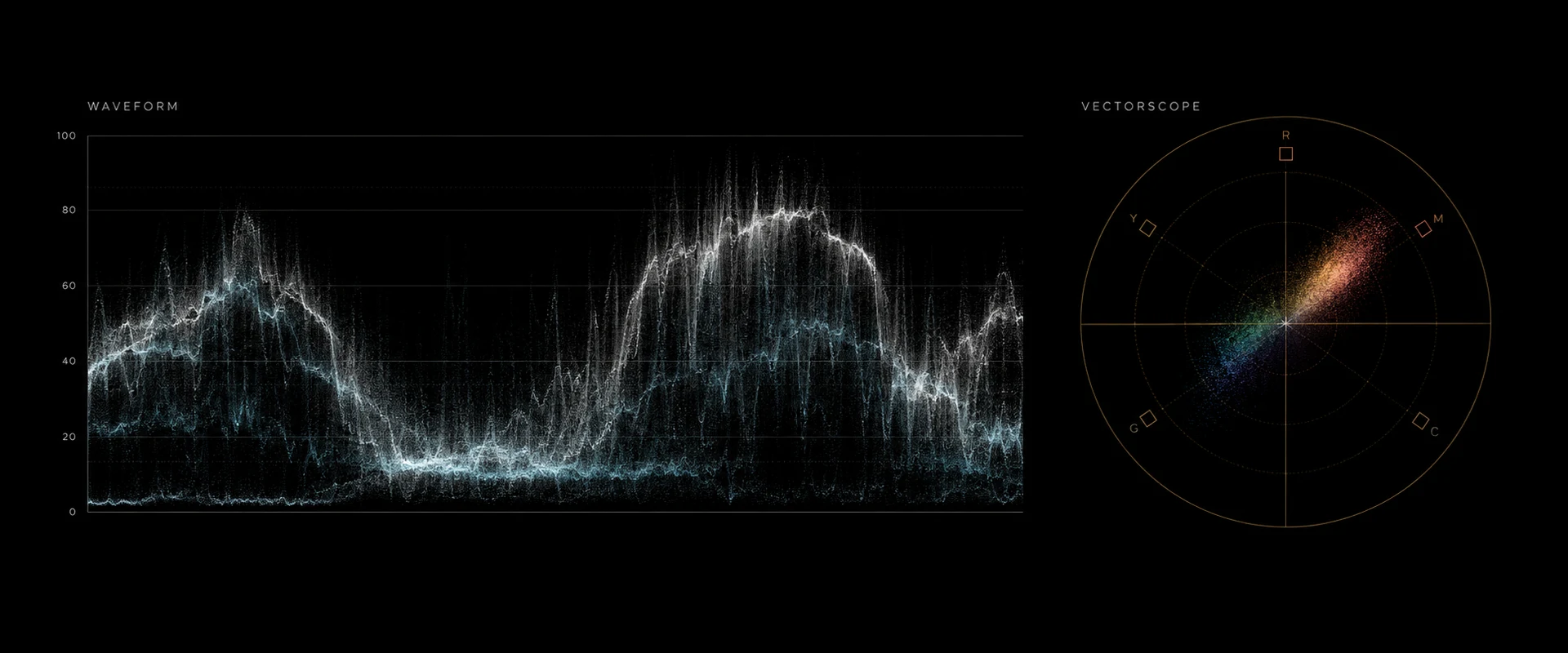
An illustration of a waveform and a vectorscope, not a screenshot of graded footage. The waveform reads exposure and contrast; the vectorscope reads color balance and saturation.
How to read the display
Take a shot of a person standing in front of a bright window. On the waveform, the window appears as a band high up, at the horizontal position the window occupies in the frame. The person appears as a lower band, at their position. A dark corner of the room appears near the floor of the scope.
That is the whole trick: horizontal position is preserved, vertical position is brightness, and every pixel in the column contributes a dot. A column of sky produces a thin flat line because every pixel in it is about the same brightness. A column crossing a face, a shirt and a shadow produces a tall smear because it contains many different levels.
What the waveform deliberately does not tell you is color. That is a vectorscope's job. See how to read a vectorscope.
Luma, luminance and RGB parade
The scope has modes, and they answer different questions.
Luma collapses the image to a single brightness channel and plots it. This is the default exposure read. Apple notes that its Luma mode "is available only for Rec. 709, Rec. 2020, and Rec. 2020 HLG clips and projects". Luma is defined relative to a color space, so the mode depends on what the clip is tagged as.
RGB parade splits the frame into three side-by-side waveforms, one per channel. Apple describes it as three displays "that show your video as separate red, green, and blue components". Blackmagic's summary of why you want it is the practical one: "The parade scope helps you quickly see if one color channel is stronger than the others" (Blackmagic Design, read 12 September 2026).
Use luma for exposure, parade for balance. On a correctly balanced shot, the three channels in a parade have their bottoms at the same height and their tops at the same height; a channel sitting high at the bottom is a cast in the shadows, a channel sitting high at the top is a cast in the highlights, and those are two different corrections.
RGB overlay puts the three channels on one graph in color. Denser, faster to read once you are used to it, harder to learn on.
The scale: IRE and code values
Waveforms are labelled in one of two ways and the difference matters.
IRE, 0 to 100. The traditional scale, inherited from analogue video, where 0 is black and 100 is nominal peak white. Apple offers it as an explicit unit choice: "Displays the video range in IRE units." The unit itself is older than any of this: it originated in the measurement of analogue video signals, where 100 IRE was defined as +714 mV in an NTSC signal (Wikipedia, "IRE (unit)", read 12 September 2026). Nothing about that history matters in a modern grade except the scale it left behind.
10-bit code values, 0 to 1023. What the file actually contains. The relationship between the two is the part that trips people up, because there are two conventions in use:
- Legal (video) range puts black at code 64 and nominal white at code 940, so IRE = (CV − 64) ÷ 876 × 100. This is what Rec.709 deliveries use. The relevant standard is ITU-R BT.709, "Parameter values for the HDTV standards for production and international programme exchange", currently BT.709-6, approved June 2015 (ITU, read 12 September 2026).
- Full range uses the whole 0–1023 scale, so the "percentage" a scope shows is simply CV ÷ 1023.
Most camera log formats are recorded full range. Sony, Panasonic, ARRI and Canon all state it for their own curves, and Blackmagic Film Generation 5 is the common exception: Blackmagic's own published mapping table puts zero reflectance at code 145 and an 18% grey card at code 400, which is 64 + 876 × signal (video levels, not full range). Getting that backwards moves black by fifty code values. (Both statements come from the manufacturers' own published documents.)
The practical rule: read the number your scope is showing you, and know which convention it is on, because 40 IRE and 40% are not the same signal.
Where things should sit
Black. The darkest thing you want detail in should sit just above the floor, not on it. A trace stacking flat along 0 means shadows are crushed: those pixels are all exactly black and no grade will bring them back. A deliberate crush is a look; an accidental one is a loss.
White. The brightest thing you care about should sit near but below 100. Specular highlights (a glint off chrome, the sun on water) are allowed to clip; a white shirt or a face is not. A trace piled flat along the top is clipped, and the same rule applies: nothing recovers it.
Skin. Faces are the anchor. In a Rec.709 delivery, a typical face sits somewhere around 50–70 IRE; Videomaker's on-set guidance for log shooting uses the same window, advising you to place "midtones or skin tones" at roughly 50–70% (Videomaker, read 12 September 2026). This is a range, not a rule (a low-key scene puts faces lower on purpose), but a face at 30 or at 90 is worth a second look.
18% grey, on log footage. This is where log changes the numbers. An 18% grey card does not read 50 IRE on a log waveform; it reads wherever that camera's curve puts it, and every manufacturer puts it somewhere different. Computed from each manufacturer's own published formula:
| Format | 18% grey: code value | Full-range % | Legal-range IRE |
|---|---|---|---|
| Sony S-Log3 | 420.0 | 41.1 | 40.6 |
| Panasonic V-Log | 433.0 | 42.3 | 42.1 |
| ARRI LogC3 (EI 800) | 400.0 | 39.1 | 38.4 |
| Nikon N-Log | 372.0 | 36.4 | 35.2 |
| Canon Log 3 | 351.3 | 34.3 | 32.8 |
| ARRI LogC4 | 284.8 | 27.8 | 25.2 |
Computed 12 September 2026 directly from each manufacturer's published encoding formula, not measured off footage. The full nine-format dataset, including 90% white and a value at every stop, is at /tools/log-reference; the background is in log footage explained.
The consequence on set and in the grade: if you are monitoring raw log on a waveform and expecting middle grey at 50, you will underexpose. Check the number for your format first. Our S-Log3 exposure guide works through one camera in detail.
Matching shots on a waveform
Two shots cut together when their tonal structure agrees, and the waveform is where you verify that.
Park on a frame from each and compare the floor (do blacks sit at the same height?), the ceiling (do highlights reach the same level?), and where the bulk of the trace sits (is one generally brighter?). Fix those three in that order (black point, white point, then midtone level) before you touch color. A pair matched on the waveform and then balanced on the vectorscope will cut; a pair matched by eye usually will not, because your eye re-adapts between the two clips.
This is also the check on any automatic match, including ours: a matched shot whose waveform is a stop off its reference has not matched, whatever the picture suggests. The full order of operations is in how to color grade video, the distinction between fixing and styling is in color correction vs color grading, and what automated matching can and cannot be trusted to do is in AI color grading explained.
Waveform vs histogram
Both show tonal distribution; only one shows you where it is.
A histogram counts how many pixels fall at each brightness level, and throws away position entirely. It tells you that 5% of the frame is near-black. It cannot tell you whether that is a deliberate shadow in the corner or the subject's whole face.
A waveform keeps the horizontal axis, so the shape of the picture is visible in the shape of the trace. You can see that the left third of the frame is dark and the right third is blown, and act on it. For exposure work, the waveform is strictly more informative; the histogram's advantage is that it is smaller and easier to glance at on a camera body.
In Leumos
Leumos is our own product: a browser color grading studio with built-in scopes. Its own documentation describes them as displays that let you "inspect exposure, color balance, and saturation with built-in waveform and vectorscope displays" (leumos.ai/llms.txt, read 12 September 2026).
The workflow they serve is shot-shaped. Import footage, inspect detected cuts, match one selected shot to a still, and review the result in motion. Use the waveform to set exposure and protect highlights while refining the creative grade; compare neighboring cuts before exporting the finished rendered video. A copied grade remains a starting point until each destination shot is checked.
FAQ
What does a waveform monitor show?
Signal level plotted against horizontal position in the frame. Height is brightness, and the left-to-right axis matches the picture, so you can see which part of the image is dark or blown. Apple describes its own as showing "the relative levels of luma, chroma, RGB, or luminance" in the clip.
What is IRE on a waveform?
A brightness scale from 0 to 100, where 0 is black and 100 is nominal peak white. On a legal-range Rec.709 signal it maps to 10-bit code values by IRE = (CV − 64) ÷ 876 × 100, so black is code 64 and white is code 940. Full-range signals use the whole 0–1023 scale instead.
Where should skin tone sit on a waveform?
For a Rec.709 delivery, a typical face usually lands somewhere around 50–70 IRE, with low-key scenes deliberately lower. It is a starting range, not a rule. On un-normalised log footage the number is different for every camera format. Check your curve's published middle-grey value first.
What is the difference between a waveform and an RGB parade?
A waveform in luma mode plots one combined brightness channel and answers exposure questions. An RGB parade splits the frame into three side-by-side waveforms, one per color channel, and answers balance questions: Blackmagic notes it "helps you quickly see if one color channel is stronger than the others".
Waveform or histogram: which is better for exposure?
The waveform, because it keeps horizontal position. A histogram tells you how much of the frame is dark; a waveform tells you which part of the frame is dark. The histogram's only real advantage is being compact enough for a camera body display.
How do I spot clipping on a waveform?
Look for the trace going flat against a boundary. A hard line along the top means highlights are clipped; a hard line along the bottom means shadows are crushed. In both cases the detail is gone rather than hidden, so it is a shooting fix or a re-grade of a different take, not a recovery.